Physical Address
304 North Cardinal St.
Dorchester Center, MA 02124
Physical Address
304 North Cardinal St.
Dorchester Center, MA 02124

→ Article about explaining CLIP and demonstrating image classification using CLIP models.
I normally like to write an introduction paragraph about the article, but not this time. I want to directly explain what CLIP(Contrastive Language-Image Pre-Training) is, and how we can use it. So, let’s together explore what CLIP is, how it works, and how to perform classification.

Also, I have a YouTube video about this article, you can watch it.
CLIP (Contrastive Language-Image Pre-Training) is a deep learning model that was trained on millions of image-text pairs. It is not like usual image classification models; there are no predefined classes. The idea is to learn association with images and relevant texts, and by doing so, with millions of examples, the model can learn different representations.
An interesting fact is that these text and image pairs are collected from the internet, websites like Wikipedia, Instagram, Pinterest, and more. You might even contribute to this dataset without even knowing it :). Imagine someone published a picture of his cat on Instagram, and in the description, he wrote “walking with my cute cat”. So this is an example image-text pair.
These image-text pairs are close to each other in the embedded space. Basically model calculates similarity(cosine similarity) between the image and the corresponding text, and it expects this similarity value to be high for image-text pairs.

Later in this article, we will give a set of input texts to an image, and we will expect the model to give a high score to the most relevant text. The model will basically encode image and text inputs, and calculate similarity between the image and each text. So, there will be multiple similarity scores(equal to the number of text inputs), and we will choose the pair that has the highest similarity score as the final prediction.

There are different backbone models, like ResNet and Vision Transformers. I will stick with ViT-B/32, but you can use a different backbone.
There will be two different code section:
The first part is exactly about finding similarity between images and predefined sentences, but the second part is more interesting. Using COCO labels(80), we will create 80 input sentences, and we will use these sentences as input to the CLIP. After the model finds similarity scores between a single image and 80 sentences, we will choose the image-text pair that has the highest score, and the label of that pair(the highest score) will be our output label.
You can directly follow CLIP’s GitHub repository(link) for the installation guide. You need to have GPU supported PyTorch environment and a few more packages. If you had any problem creating GPU supported PyTorch environment, you can read my article. Also, you can directly use Google Colab.
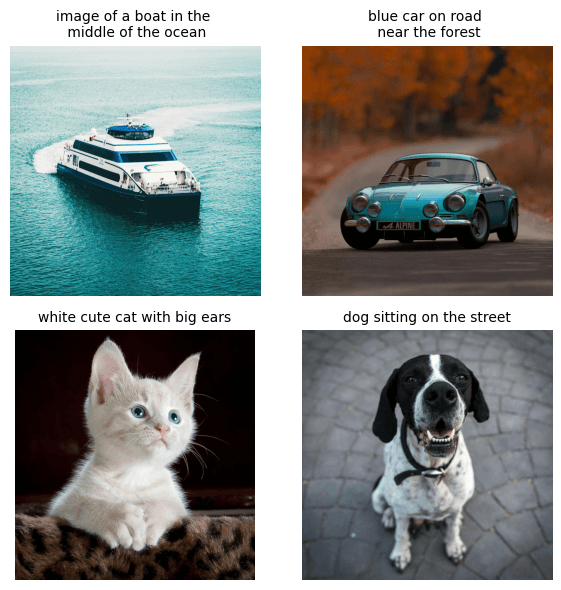
Now, I have 4 different images and sentences, let’s see the cosine similarity value of these pairs. We will calculate similarity scores between each image and sentence, and we will display similarity scores in a matrix. I have four different images under the images folder, but you can use any set of images.
import torch
import clip
from PIL import Image
import matplotlib.pyplot as plt
import numpy as np

device = "cuda" if torch.cuda.is_available() else "cpu"
model, preprocess = clip.load("ViT-B/32", device=device)

descriptions = {
    "boat": "image of a boat  in the middle  of the ocean",
    "car": "blue car on road  near the forest",
    "cat": "white cute cat  with big ears",
    "dog": "dog sitting  on the street",
}
# list for displaying original images in the plot
original_images = []
images = []

# Preprocess images and store original images
for name in descriptions.keys():
    path = f"images/{name}.jpg"
    img = Image.open(path).convert("RGB")
    original_images.append(np.array(img))
    images.append(preprocess(img))

# Stack images
image_input = torch.stack(images).to(device)
# Tokenize texts
texts = list(descriptions.values())
text_tokens = clip.tokenize(["This is " + desc for desc in texts]).to(device)

# Encode images and texts
with torch.no_grad():
    image_features = model.encode_image(image_input).float()
    text_features = model.encode_text(text_tokens).float()

# Normalize features
image_features /= image_features.norm(dim=-1, keepdim=True)
text_features /= text_features.norm(dim=-1, keepdim=True)

"""
Compute similarity
image_features: normalized image feature vector
text_features: normalized text feature vectors
"""
similarity = text_features.cpu().numpy() @ image_features.cpu().numpy().T
count = len(texts)

# Plot similarity matrix
plt.figure(figsize=(12, 8))
plt.imshow(similarity, vmin=0.0, vmax=1.0, cmap="viridis")
plt.yticks(range(count), texts, fontsize=14)
plt.xticks([])

# Overlay images below x-axis, reduce vertical extent to save space
for i, image in enumerate(original_images):
    plt.imshow(image, extent=(i - 0.5, i + 0.5, -1.0, -0.2), origin="lower")

# Annotate similarity scores
for x in range(similarity.shape[1]):
    for y in range(similarity.shape[0]):
        plt.text(x, y, f"{similarity[y, x]:.2f}", ha="center", va="center", size=12, color="white")

# Remove spines
for side in ["left", "top", "right", "bottom"]:
    plt.gca().spines[side].set_visible(False)

plt.xlim([-0.5, count - 0.5])
plt.ylim([count - 0.5, -1.2])  # shrink vertical space
plt.title("Cosine similarity between text and image features             ", fontsize=20, pad=20, loc='center')
plt.tight_layout()
plt.show()
You can see the similarity scores between each image and sentence.
Now, we will create our own sentences automatically using COCO labels, using this formula:
There are 80 different labels, so sentences will be like:
After calculating similarity scores between a single image(white cat in my case) and 80 labels, we will choose the pair that has the highest similarity score, and in this way, we will classify objects. You can find COCO labels from here, or you can use any different label set; it doesn’t matter. You can even create custom label sets; you just need to create a text file and write labels on it one by one.
import torch
import clip
from PIL import Image

# use GPU
device = "cuda" if torch.cuda.is_available() else "cpu"
# pretrained model vision transformer model
model_name = "ViT-B/32"
# labels
labels_file = "coco-labels-paper.txt"
# image path
image_path = "cat.jpg"  # !!! Change to your test image path

# Load the CLIP model
model, preprocess = clip.load(model_name, device=device)

# Load COCO labels from the text file
with open(labels_file, "r") as f:
    classes = [line.strip() for line in f.readlines() if line.strip()]

# Create text prompts from COCO labels
text_descriptions = [f"This is a photo of a {label}" for label in classes]
"""
This is a photo of a dog
This is a photo of a cat
This is a photo of a car
This is a photo of a bicycle
......
"""

# Tokenize text descriptions
text_tokens = clip.tokenize(text_descriptions).to(device)

# Encode text descriptions
with torch.no_grad():
    text_features = model.encode_text(text_tokens)
    text_features /= text_features.norm(dim=-1, keepdim=True)

# Load and preprocess your image
image = Image.open(image_path).convert("RGB")
image_input = preprocess(image).unsqueeze(0).to(device)

# Encode image
with torch.no_grad():
    image_features = model.encode_image(image_input)
    image_features /= image_features.norm(dim=-1, keepdim=True)

    # Compute similarity using cosine similarity
    similarity = (100.0 * image_features @ text_features.T)
    probs = similarity.softmax(dim=-1)

# Get top-5 predictions
top5_idx = probs.topk(5).indices[0].tolist()

print("\n Top 5 Predictions:")
for idx in top5_idx:
    print(f"- {classes[idx]} ({probs[0, idx]*100:.2f}%)")
Here is the output: